
Tower Lab Upgrades and Tech Trees
Each of the 20 cubes has a tree. Modules stack. Refunds exist. Tesla is the taught example.
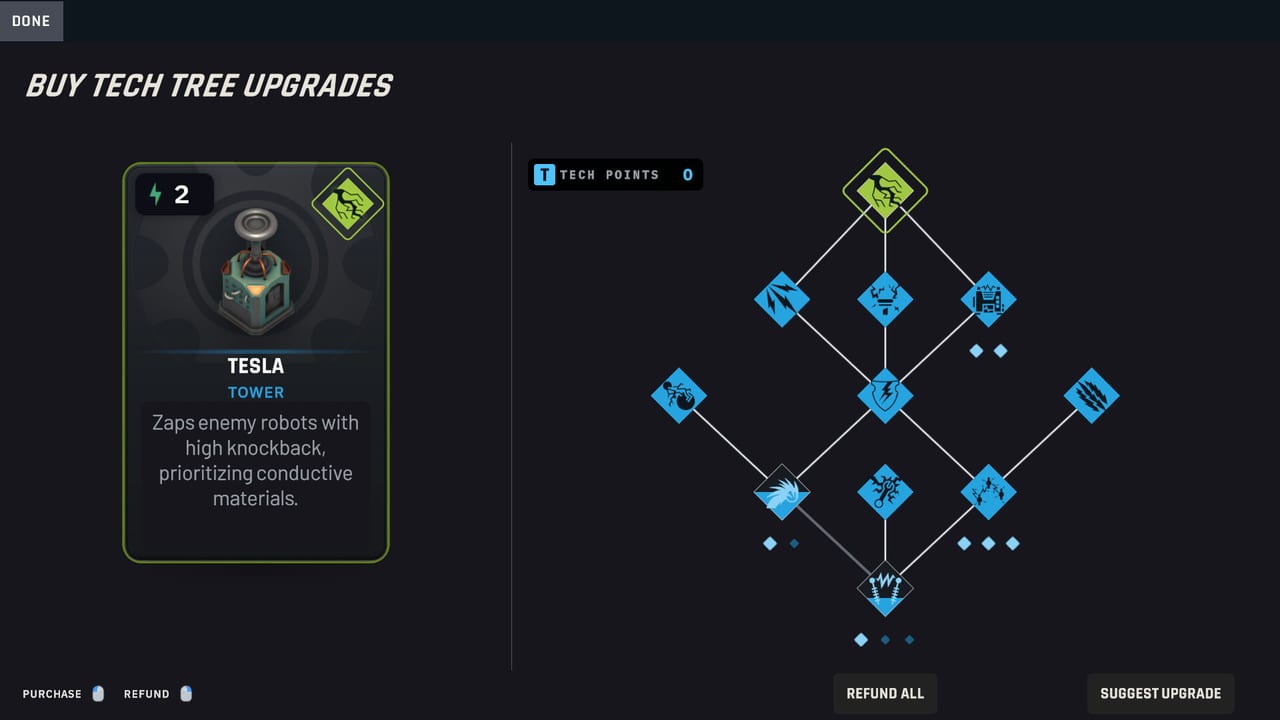
Every playable tower in Tower Lab has its own tech tree. Early Access is targeting 20 towers and more than 150 upgrades. Steam Early Access is scheduled for September 7, 2026. You buy those upgrades with Tech Points (T) on a placed cube, not with a global damage slider, because there is no damage slider. Modules change how the cube behaves in physics: extra targets, extra bounces, extra mass, extra chain jumps.
This page is the UI and the spending rules. Cube roles live on the tower roster. Combo diagrams live on tower synergies. If you still need the turn structure, read how to play. Cores and machines change what you start with, so they sit on cores and machines.
Buy Tech Tree Upgrades
The in-game prompt is Buy Tech Tree Upgrades. Select a cube you already placed. The tree is that cube’s, not a shared account unlock you bring into every mode. Campaign meta-progression still unlocks cards, cores, and machines across runs. The modules you buy with T are for this run’s board.
Tech Points are the T resource next to Matter (M) and Energy (lightning). Matter buys and rerolls in the shop. Energy plays cubes from your hand. T mutates a cube that is already earning its keep. If a cube is in a bad spot, move it before you feed it T. Placement is free in open space.
The UI can suggest an upgrade. Use Suggest when the tree is wide and you would rather not stall the wave. Ignore Suggest when you already know the machine: Double Strike on a copper Tesla, bounce on a Mine line, extra gust on a Fan that already aims at an edge.
Stackable modules
Official upgrade footage uses Tesla as the tutorial tree. By default Tesla fires a single electrical arc that knocks robots back. Double Strike lets it attack an additional target. Because the module stacks, buying it more than once adds more targets. Another module makes each arc chain to a nearby unit. That also stacks, so you increase the number of jumps. Combined, each base arc can chain.
That pattern is the rule for the rest of the roster even when a specific module name is not public. Look for modules that add a physics verb: more targets, more bounces, more orbit, more gust, more payload size. Stack the verb your machine already uses. A second bounce module on Deflector is plumbing. A random flame module on a Gravity well is a side quest.
Playtest notes mention capstones on Fan and Tesla. Treat a capstone as the end of that branch, not as a second tree. If a capstone fights your machine, refund and walk a different branch.
Tesla as the taught example
Tesla is the cube the developers used to explain the system, which is why this page embeds the official roguelike tower upgrades video. It is also the cube that got strong enough, early enough, that Region 1 no longer starts with it. Playtest notes removed Tesla, Salvage, and Hot Swap from the Region 1 starting deck.
Spend T on Tesla when three things are true: copper is on the board, you already have a shove or a Shrink for the bodies Tesla will ignore, and Double Strike or chain is actually in the tree this run. If the region is rubber-heavy, T on Fan, Shrink, or Deflector will leak less.
Other confirmed module flavors from videos and playtests include bouncing lines (a rubber material on a payload, which bounces about the way you would expect), bouncy mines, extra Tesla range, and extra barrels on Bomb from a stacked-barrel experiment that helped push the Deflector rework. Do not treat those names as a complete 150-entry list. Treat them as proof that modules grant materials and extra emitters, not plus-damage nodes.
Refunds and Suggest Upgrade
You can refund. Refund is how you survive a bad Suggest, a region shift from copper to rubber, or a Gravity well that started capturing robots forever before projectile lifetime was rebalanced. Refund is not a profit engine. It is a permission slip to experiment.
Suggest Upgrade is a speed tool. It is not a hidden optimal solver. If Suggest wants to feed a cube that is not part of your hold-shove-lighten-cash loop, skip it. The synergies page is a better solver than a generic prompt, because it knows Fan plus Gravity is a spiral and Shrink then Fan is a knockoff.
A practical T order
- Fix placement. Move the cube so its verb hits the lane.
- Spend T on the cube that already has a partner. A Fan that aims at a Gravity well deserves gust modules. A lonely Bola can wait.
- Stack one verb. Two ranks of Double Strike beat one rank of Double Strike and a random side module.
- Spend leftover T on production only after the knockoff edge is real. Grinder conveyor toys are delightful. They do not stop a leak.
- Refund if the next region’s materials laugh at your tree.
Campaign, Standard TD, Endless, Puzzle, and Workshop all use these trees. Puzzle cares about a clean machine with few cubes. Endless cares about a tree that still works when the map expands. Campaign cares about a tree that survives Hazard Cores. For the mode list, see the campaign walkthrough.
Cores and machines sit under the tree, not inside it. A machine is a run-defining loadout with unique starting items and a real-time ability. A player core rewrites a rule for the run. A Hazard Core is the campaign’s extra tax. None of those replace Buy Tech Tree Upgrades. They change which cube you bother to feed. Read cores and machines before you blame a tree for a loadout problem.
First T belongs on the cube that already shares a job with another cube on the board. If nothing shares a job, you do not have an upgrade problem. You have a hand problem. Open the tower roster and how to play, then come back to this tree when two cubes are already talking.
Frequently Asked Questions
Quick answers for new Tower Lab players.
What are Tech Points in Tower Lab?
Tech Points (T) buy modules on a placed tower through Buy Tech Tree Upgrades. Matter buys shop cards. Energy plays the hand. See how to play for the full turn.
Do tower upgrades stack?
Yes. The official Tesla example stacks Double Strike for extra targets and stacks chain-to-nearby for extra jumps. Details are on this upgrades page.
Can I refund a module?
Yes. Refund a branch that no longer fits the region or the machine. Suggest Upgrade is optional and is not an optimal solver.
Why is Tesla the upgrade example?
The developers used Tesla in the official upgrades video. It is also strong enough that playtests removed it from the Region 1 starting deck. Roles are on the tower roster.
How many upgrades are in Early Access?
The launch target is more than 150 tower upgrades across 20 cubes. Confirm counts on the Early Access page.
Do cores replace tech trees?
No. Machines and player cores change starting tools and run rules. You still buy modules with T. Compare them on cores and machines.