
Tower Lab Workshop and Sandbox
A level builder with Steam Workshop sharing. Access the toolbox, then publish a lab other operators can break.
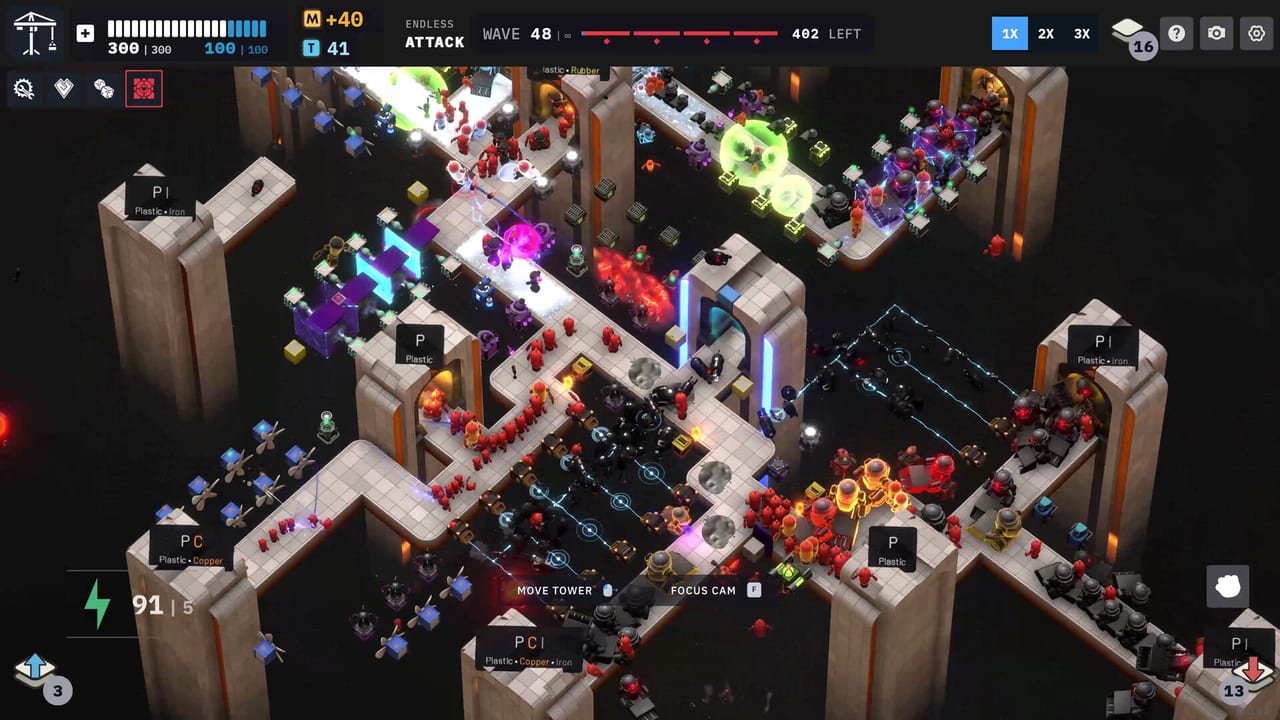
Tower Lab’s sandbox is a level builder, not a second campaign. Steam Early Access is scheduled for September 7, 2026. The store lists a sandbox where you can access everything, build and decorate levels, and share them on Steam Workshop. This page is how to use that mode without treating it like a ranked run.
Campaign is the roguelite spine. Workshop is the bench. Use the campaign and mode comparison if you still need the five-mode map. Use this page when you want to place every cube, test a Fan-plus-Gravity spiral, or publish a community challenge.
What the store actually promises
Early Access currently includes a sandbox level builder with Steam Workshop support for player-created levels. The full-version FAQ adds expanded Workshop support. The developers also wrote that Workshop tooling is still being tuned with community feedback. That sentence matters: day-one Workshop may miss buttons you saw in a concept clip. Confirm the live editor on the Early Access notes and Steam’s Workshop hub for app 3084810.
Sandbox is single-player creation plus sharing. It does not put a second operator in your lab. Leaderboards belong to Endless and other scored modes, not to a decorative sandbox. If you want waves and Matter ranks, open leaderboards.
Photo Mode lives on the HUD in every mode. Use it in Workshop when a contraption finally throws a Copper body into the void and you want the screenshot. It is not a physics override.
How to use the builder
Think like a puzzle author, then like a player.
- Block out spawn and exit portals first. A lab without a walkable path is not a challenge; it is a screenshot.
- Leave cliffs, air lanes, and conveyor room. The enemies and materials page is the test: Copper needs a Tesla lane, Plastic needs a Fan corridor, Rubber needs bounce space.
- Place cubes in open space the same way Campaign does. Right-click still sells or opens a tech tree if the sandbox grants upgrades.
- Press Start Attack or Simulate. Simulate is the Workshop habit. Do not score a broken layout as a personal failure.
- Decorate after the physics works. Plants and lights do not knock robots. Mass does.
Energy, Matter, and tech points may be unlocked or infinite depending on the live sandbox flags. This wiki will not invent a sandbox economy. If the editor gives you every cube, you are testing combos from the tower roster and synergies, not drafting a Region 1 hand.
What to publish
Steam Workshop is for levels other people can load. Publish a lab that has a readable goal:
- A knockoff corridor that teaches Fan plus Shrink.
- A Copper lane that only works if Tesla is placed on the conductive path.
- A Puzzle-style optimization: clear the wave with three cubes, or with a Matter target.
- A decorative lobby that still has a spawn and an exit, so it is playable.
Do not publish an unwinnable pit and call it difficulty. The developers said the most creative community ideas will help inspire official content. That is an invitation to be clever, not cruel.
Name files and titles with the physics job, not a meme only you understand. Players searching Workshop will look for Fan, Gravity, Tesla, Endless-style gauntlets, and beginner labs. Link the in-wiki getting started page in your Workshop description if the level is a tutorial. Use locale-agnostic paths if you paste wiki URLs; this site localizes /guides/workshop/ for you.
Workshop versus the other four modes
Campaign locks shopping between stages and uses Hazard Cores as difficulty taxes. Standard TD spends Matter even mid-wave from an unlocked toolbox. Endless grows the map and writes leaderboards. Puzzle is a scored optimization. Workshop is the only mode whose job is authoring.
If you are learning the game, do not start in Workshop. You will place twenty cubes, press Start Attack, and learn nothing about energy discipline. Learn the loop in how to play, then open Workshop to freeze a combo you already understand.
If you are a maker, Workshop is the reason to stay after a failed Campaign run. Rebuild the same cliff with a Deflector you could not afford in Region 1. Then subscribe to someone else’s lab and steal a routing joke.
Limits and honesty
Workshop tooling is listed as in progress for Early Access. Sandbox “access everything” is store copy, not a guarantee that every unreleased 1.0 cube is in the editor on September 7, 2026. When a patch adds a trap or machine, this page will still point at the patch notes instead of pretending the editor already had it.
There is no Trello. Official editor talk is Discord and Steam, listed on community links. This wiki is unofficial. If Steam Workshop is empty on launch morning, that is a tooling delay, not a missing wiki page.
Build a lab you would actually play. Share it. Then go back to Campaign with a combo you proved on the bench.
Frequently Asked Questions
Quick answers for new Tower Lab players.
Is Workshop a multiplayer mode?
No. You build and share levels. Other players load them later. Nobody else sits in your sandbox. Tower Lab is single-player.
Should new players start in Workshop?
No. Learn energy and Start Attack in getting started and how to play. Workshop is the bench after you know the loop.
Can I publish levels on day one of Early Access?
The store lists Workshop support. Tooling is still being tuned. Confirm the live editor on Steam after September 7, 2026.
Does sandbox ignore physics rules?
No. Copper still takes Tesla's 3x knockback. Plastic still leaves a Fan corridor. See enemies and materials.
Where do I find shared labs?
Steam Workshop for app 3084810, plus Discord contraption posts linked from community links.