
Tower Lab Physics Guides Hub
A reading map for knockoff builds, campaign modes, and first-hour deck loops before Steam Early Access.
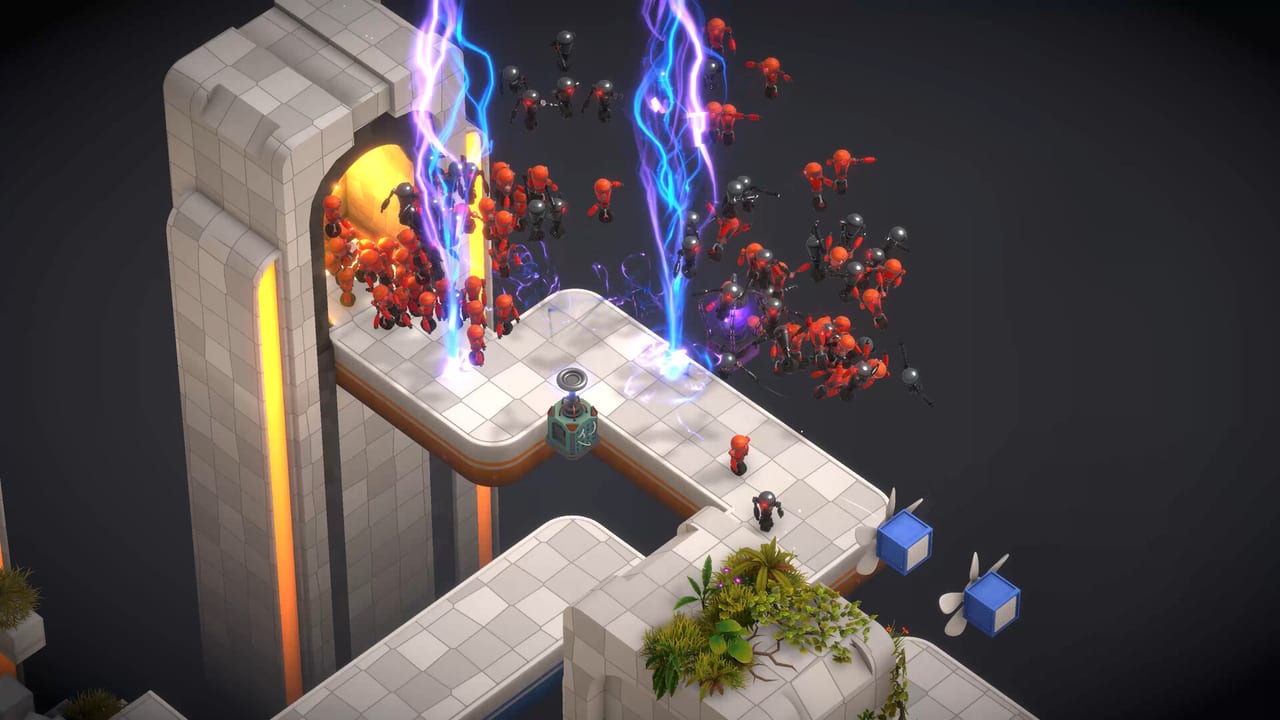
Tower Lab is a single-player physics roguelite tower defense from Devon Powell and Xueer Zhu (Play Tug Studio). Steam Early Access is scheduled for September 7, 2026 on Windows and macOS, with a Steam Deck Playable rating. Robots have no health. You win by knocking them off floating labs, not by grinding a hit-point bar. This hub is the reading map for that idea: first-hour setup, the card-and-energy loop, the physics that actually moves mass, and the five modes you pick after the tutorial.
The public demo ran from January 23 to June 29, 2026 and was taken down ahead of launch. Treat demo notes as a snapshot. The Early Access store list is the launch target: 20 towers with 150+ upgrades, 26 player cores plus 14 Hazard Cores, 7 physics-effect cards, 8 utility cards, 7 traps, 5 machines, 3 campaign regions, and 5 modes. Demo collection screens showed a slightly smaller set of cores, machines, and traps; this wiki prefers the store numbers for launch and flags the demo only when a page is clearly talking about that earlier build.
First-hour reading order
Start with the first-hour getting started walkthrough if you have not launched a lab yet. It covers wishlist and install, the modes menu, placing towers in open space, spending energy from your hand, pressing Start Attack, collecting Matter, and using the Vend-O-Lab between stages.
Then read the full how-to-play loop. That page is the ruleset: draw a hand each wave, play cards only if you have energy, separate the build phase from the attack phase, use Simulate and 1X/2X/3X speed, and spend the shop on buys, rerolls, card removal, and tech-tree ranks.
The physics basics for knockoff builds is the page that replaces a damage wiki. Mass, grow versus shrink, Plastic / Iron / Copper combinations, and the difference between a clean knockoff and a leak to the exit all live there.
When you are ready to pick a playlist, open the campaign and mode comparison. Campaign is the roguelite spine. Workshop, Standard TD, Endless, and Puzzle each train a different skill. You do not need all five on day one.
If you are still deciding whether to wishlist, read the pre-launch review and preview. It covers the demo’s 95% score from 44 reviews, the Rock Paper Shotgun take, and the Early Access risks of a two-person team.
When a wave leaks, open enemies and materials for Copper’s Tesla 3x knockback, Plastic, Iron, and Rubber. When you want to author a lab instead of draft a run, open workshop and sandbox. Demo version labels live on patch notes. Endless ranks live on leaderboards.
Systems that sit next to the guides
Guides explain the loop. Loadout pages explain the pieces. Use the tower systems hub and the complete tower roster when you need the twenty names split into Offense, Control, and Production. Rankings live on the tier list overview and the tower tier rankings. Concrete openers live on the build catalog hub and the starter deck examples.
Do not treat those hubs as separate games. A Tesla that prioritizes conductive materials is only as good as the Fan, Gravity, or Grow piece feeding it mass. A Grinder is a production building, not a turret: it turns robots into Scrap and wants a Conveyor Line off the output. This Way signs are traps with a 10% follow chance, not walls.
What every guide on this wiki assumes
Matter (M) is shop currency. Bigger and grown robots pay more. Energy (the lightning icon) is the cost to play cards from your hand; hand and energy refresh each wave. Tech points (T) buy tech-tree upgrades, including from the shop. The Vend-O-Lab sits between stages: buy cards, reroll, remove a card, upgrade the tech tree, then take the next level.
Placement is mouse-driven. Right-click a tower to sell it or open its tech tree. On-screen prompts cover Rotate Cam, Reset Cam (N), Toggle Cooldown (Tab), Move Tower, and Focus Cam (F). Steam lists Mouse Only Option, Save Anytime, and Camera Comfort. The HUD also carries Start Attack, Simulate, 1X/2X/3X speed, and photo mode.
The game is single-player. It is not a Roblox experience. Leaderboards and Workshop sharing exist; you still run the lab alone. Official chatter lives on Discord and Steam. This wiki does not invent a Trello board or a current dollar price. Early Access is planned for about six to twelve months, with a price rise of about 25% after 1.0.
If you only have time for one sitting before September 7, 2026, run this order: first-hour setup, the play loop, physics, then modes. Bookmark the tower, tier, and build hubs so you can jump back after your first Vend-O-Lab visit instead of rereading this index.
Frequently Asked Questions
Quick answers for new Tower Lab players.
Where should a new Tower Lab player start?
Read the first-hour getting started walkthrough, then the full how-to-play loop and the physics basics for knockoff builds. Pull names from the complete tower roster only after you can press Start Attack without fighting the camera.
Is Tower Lab out yet?
Steam Early Access is scheduled for September 7, 2026. The public demo ran from January 23 to June 29, 2026 and is no longer the live client. See the Early Access launch notes for the current window.
Should I trust demo collection counts or the Steam store list?
Prefer the Early Access store list for launch: 20 towers, 26 player cores, 14 Hazard Cores, 7 traps, and 5 machines. Demo collection screens were an earlier snapshot with slightly fewer cores, machines, and traps.
Is this a Roblox wiki or a multiplayer guide?
Neither. Tower Lab is a single-player Steam game. Workshop sharing and leaderboards do not put a second player in your lab.
How is this hub different from the tower and build pages?
This hub sequences the rules. The tower systems hub, tier list overview, and build catalog hub hold names, rankings, and example decks. Use both layers; do not skip physics to memorize a tier letter.
Is there a review if I have not bought the game yet?
Yes. The pre-launch review and preview is the wishlist page: demo reception, who the physics pitch is for, and which Early Access risks to accept.