
Tower Lab Builds Hub
Named physics plans, Matter budgets, and shop pivots for a game with no health bars.
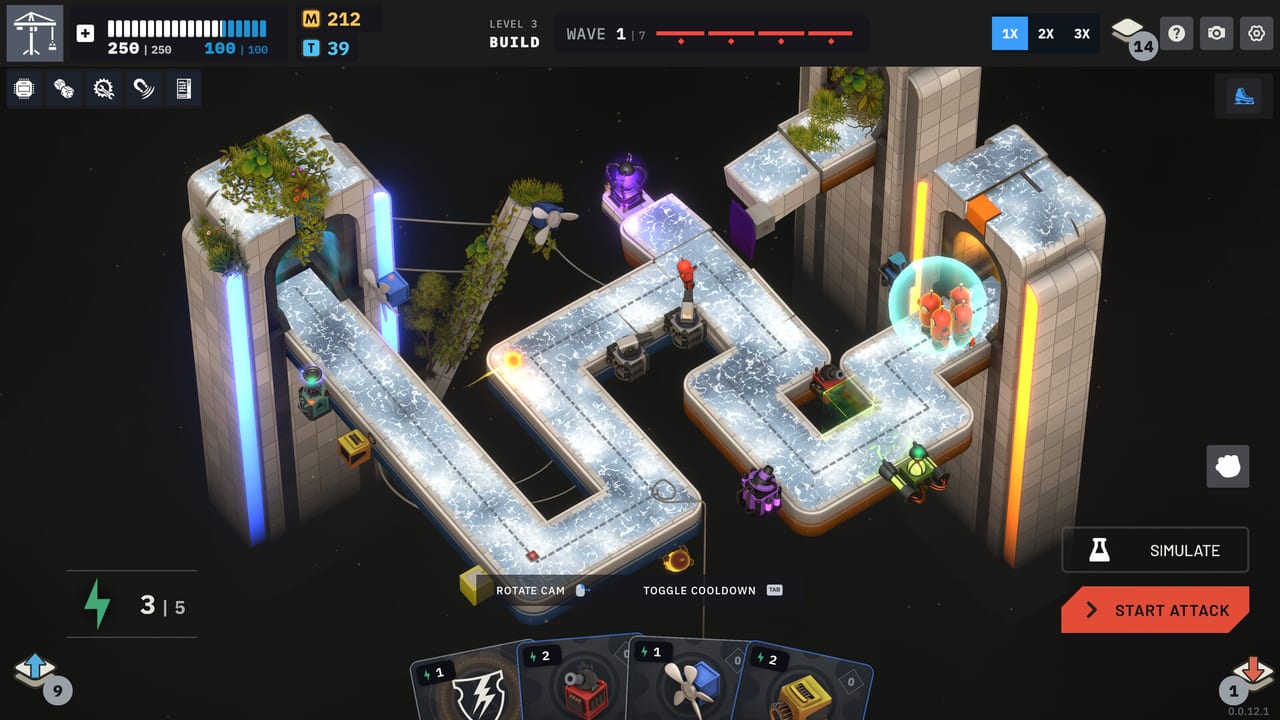
A Tower Lab build is not a DPS spreadsheet. Robots have no hit points. You win a wave by knocking them off a floating lab, so the plan that matters is a chain of forces: wind into orbit, electricity into a fan, grinders into a trap that aims the scrap. This hub is the map of those plans. Steam Early Access is scheduled for September 7, 2026 as a single-player Windows and macOS title from Devon Powell and Xueer Zhu (Play Tug Studio). Nothing here assumes the game is already on your library shelf.
Start with a named opener on the starter decks page, then learn why grown robots pay more Matter on Matter farming. Cross-check the physics with tower synergies and the current tower tier list so you are ranking machines, not isolated turrets.
What a Tower Lab build actually is
Twenty towers share one rule: they change mass, direction, temperature, or contact. Mine, Kinetic, Pulse, Tesla, Bomb, Harpoon, Rocket, Deflector, Fan, Gravity, Bola, Cryo, Flame, Shrink, Grow, Merge, Split, Imploder, Grinder, and Constructor do not deal scripted damage numbers. A Fan does not “do 40 wind damage.” It applies force. Gravity captures. Shrink makes a body cheap to move. Grow makes the same body expensive to move and expensive as loot. Merge and Split rewrite how many bodies occupy the lane. Grinder and Constructor chew and rebuild. Tesla arcs. Deflector bounces. If two cards do not physically touch the same robot, they are not a combo yet.
That is why this wiki groups builds by physics jobs instead of by “carry tower.” Wind Orbit is Fan plus Gravity plus Shrink. Conductive Knockback is Tesla plus Fan plus Deflector. Scrap Line is Grinder plus Constructor plus the This Way trap. Those three named plans live on the starter decks page with a Region 1 warning: Tesla, Salvage, and Hot Swap were pulled from the opening deck in a patch, so do not pretend Tesla is waiting in the first Vend-O-Lab.
Energy is the cost to play cards from your hand. Matter (M) is the knockoff payout you spend in the shop. Tech points (T) buy nodes on each tower’s tree. A build that ignores any one of those three currencies stalls. You can place towers in any open space and move them freely, so the layout is part of the deck: the same three cards fail if you stack them on the spawn and succeed if you aim them at an edge.
How the loop funds your plan
Between stages you enter the Vend-O-Lab. Example prices from a pre-launch shop screenshot: Grinder for M200, This Way trap for M200, Fan for M200, Tesla for M400. Rerolls can come up free. Removing a card costs M200 and has limited uses. You can also spend on a tech-tree upgrade or press on to the next level after you preview the incoming wave. Those numbers are examples, not a forever price list, but they teach the real budget: Tesla is a premium buy, traps compete with towers, and a dead card in the deck is worth paying to delete.
Matter scales with size. Knocking off a grown robot pays more than knocking off a shrunk one. That is the entire risk curve of Matter farming. Shrink is safety. Grow is a tax you levy on yourself in exchange for a richer shop. Standard TD lets you spend Matter while a wave is still on the board, so a farming plan in that mode is a mid-fight shopping list, not a between-stage ritual. Endless uses a procedurally expanding map and weekly setups such as Overmass, which punish decks that only ever shrink.
Campaign is the roguelite spine across three regions. Workshop is the sandbox editor with Steam Workshop sharing. Puzzle is an optimization lab. The same twenty towers appear in all of them, but the build question changes: Campaign asks how you draft; Standard TD asks how you spend during the wave; Endless asks whether your engine still works when mass inflates; Puzzle asks whether one placement is enough.
Four pages that turn a pile of cards into a machine
Use this hub in a fixed order the first time, then skip around.
- Read physics basics if you still think in health bars.
- Pick an opener from starter decks and treat Region 1 as a constrained shop, not a Tesla tutorial.
- Learn the Grow versus Shrink payout on Matter farming before you greed the first Vend-O-Lab.
- Confirm the chain on tower synergies and scan the tower roster so you know what each of the twenty tools actually does.
- Rank the plan against the tower tier list and the cores and machines list once you start modifying runs.
- Spend tech points using the upgrades guide instead of buying random nodes because they glow.
The campaign walkthrough tells you which mode you are actually drafting for. A Scrap Line that wins a short puzzle can leak on a weekly Endless map. A Wind Orbit that farms Matter in Standard TD can starve you in Campaign if you never remove the cards that fight your fan.
Modes change the same twenty towers
Campaign runs are deckbuilding with meta unlocks. You will not see the full shop on Region 1, and you should not force a Tesla line until the card actually appears. Standard TD is the “classic” arcade mode: build in the middle of the wave with Matter, which makes farming and placement the same decision. Endless grows the map and the mass; weekly tags such as Overmass exist to break shrink-only comfort. Puzzle wants a clean machine, not a bloated deck. Workshop is where you prototype a layout before you stake a Campaign core on it.
Photo Mode, leaderboards, achievements, and Steam Cloud are listed for the upcoming Steam build. They do not replace a plan. If a contraption only works because you paused time and rebuilt it during Simulate, write that down; some modes will not give you that luxury at the same pace.
Prep the lab before Early Access unlocks
Wishlist the Steam page, then practice the language of this hub. Say “this Fan feeds that Gravity well” instead of “I need more damage.” Say “I am buying Grow and accepting the leak risk” instead of “I am farming.” Say “I will remove this card for M200 because it fights my edge” instead of “I will reroll forever.” Those sentences are the whole skill.
When September 7, 2026 arrives, come back to this hub after your first three shops. If Wind Orbit leaked, open Matter farming and ask whether you shrunk the payout too hard. If Conductive Knockback never came together, open starter decks and stop waiting for Tesla on Region 1. If the shop filled with traps, read tower synergies for This Way plus Grinder before you buy a fourth identical kinetic card. Builds in Tower Lab are arrangements of mass and edges. This hub exists so you arrange them on purpose.
Frequently Asked Questions
Quick answers for new Tower Lab players.
Where should I start if I have never drafted a Tower Lab deck?
Read the starter decks page first, then Matter farming. Pair both with physics basics so you stop looking for health bars.
Is there a single best build for every mode?
No. Campaign, Standard TD, Endless, Puzzle, and Workshop reuse the same twenty towers, but Matter timing and map shape change which chain is safe. Compare plans on the tower tier list after you pick a mode in the campaign walkthrough.
Do I need Tesla on my first shop?
Do not assume that. A patch removed Tesla, Salvage, and Hot Swap from the Region 1 starting deck. Wind Orbit and Scrap Line on starter decks do not require Tesla in the first Vend-O-Lab.
How does Matter relate to a build?
Bigger or grown robots drop more Matter when knocked off. That payout buys cards, rerolls, removals, and tech. The full risk curve is on Matter farming.
Are these builds for multiplayer?
No. Tower Lab is a single-player Steam game with leaderboards and Workshop levels. It is not a Roblox experience. Draft for one player, then share layouts in Workshop after Early Access opens.