
Tower Lab Tools Hub
Confirmed HUD shortcuts, mouse-first placement, and the hardware floor. No invented WASD sheet.
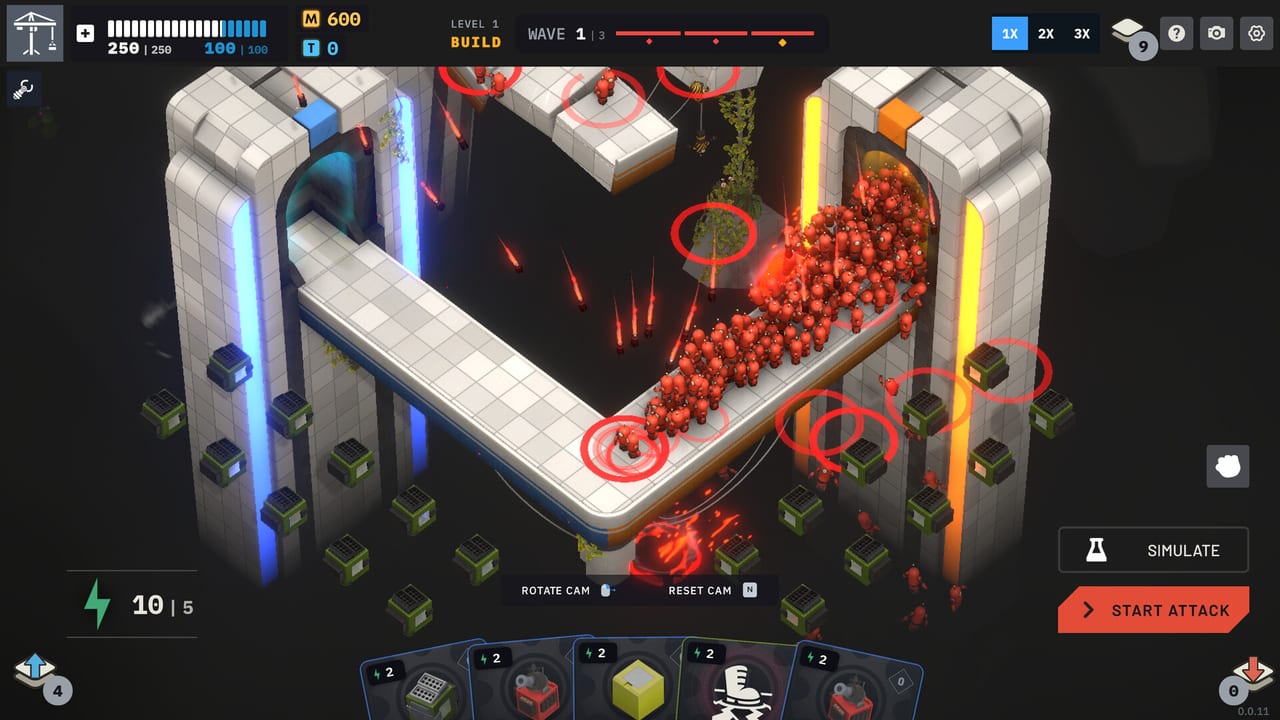
Tower Lab is a mouse-forward physics lab, not a hidden-key shooter. Before Steam Early Access on September 7, 2026, the useful “tools” are the HUD that actually ships, the accessibility flags Steam already lists, and the Windows / macOS minimums that decide whether your machine can simulate a Grinder at 3X. This hub points at those three facts. It will not invent unconfirmed keyboard binds to look complete.
Open controls for the confirmed HUD table: Rotate Cam, Reset Cam on N, Toggle Cooldown on Tab, Move Tower, Focus Cam on F, Simulate, Start Attack, and 1X / 2X / 3X. Open system requirements for Windows 10 64-bit and macOS 12 Monterey floors, 8 GB RAM, DirectX 11 / Metal, 2 GB storage, and Steam Deck Playable. Open leaderboards for Endless waves and Matter ranks. Open how to play when you need the loop those buttons serve: energy, cards, knockoffs, Vend-O-Lab.
Why a tools hub exists
Guides teach the game. Towers teach the verbs. Builds teach the sentences. Tools teach the cockpit. A player who understands Grow versus Shrink can still lose a wave because they never found Reset Cam, never toggled cooldowns, and never moved a Gravity well after placing it on a polite square. Placement is unrestricted: any open space, then move freely. The HUD is how you exercise that freedom without guessing at WASD.
Steam also lists features that are not keybinds: Mouse Only Option, Playable without Timed Input, Save Anytime, Camera Comfort, Custom Volume Controls, achievements, Cloud, leaderboards, Workshop, Photo Mode, Family Sharing. Those flags belong here because they change who can play the upcoming build, not because they change Tesla’s arc count.
Controls, HUD, and mouse-first play
The controls page is a table, not a manifesto. Confirmed keys from the HUD: N resets the camera, Tab toggles cooldown visibility, F focuses the camera. Rotate Cam, Move Tower, Simulate, Start Attack, and the speed trio are on-screen actions until a patch publishes extra binds. Right-click opens sell plus tower info and the tech tree. That right-click menu is how tower upgrades leave the wiki and enter a run.
Mouse-only is a first-class Steam option, which matches the design. You are not missing a secret chord. If a streamer uses extra keys, they may have rebound them locally; this wiki will not copy a stream overlay as official. Steam Deck is Playable, not Verified, so expect to map trackpad to mouse rather than assume a native gamepad legend.
Hardware before you wishlist
System requirements keep the floor honest:
- Windows: Windows 10 64-bit, Intel Core i5-4590 / AMD FX-8350, 8 GB RAM, GTX 960 / Radeon R9 280 (DirectX 11, 2 GB VRAM), 2 GB disk.
- macOS: 12 Monterey, Apple M1 or Intel Core i5 2018+, 8 GB RAM, M1 / Iris Plus 640 / Radeon Pro 555, Metal, 2 GB disk.
- Steam Deck: Playable.
- Not listed as a supported platform: Linux desktop. Do not read Proton leftovers as a store promise.
Physics sims hitch when you Grow a pack and run Imploder plus Grinder at 3X. Minimum GPU is the difference between Simulate being useful and Simulate being a slideshow. Read that page before you blame a starter deck for leaking.
How to play versus how to bind
How to play and getting started teach energy, Matter, wave preview, and the no-HP rule. This hub does not repeat those lessons. It answers “which button starts the attack” and “will this Mac book even launch.” If you need Campaign versus Endless, that is the campaign walkthrough. If you need shop prices, that is Matter farming.
Use both layers on day one of EA: cockpit first, then loop. A player who knows Tab toggles cooldowns drafts better because they can see whether Fan is ready. A player who knows N resets cam stops losing robots off-screen and calling it a physics bug.
Use this hub as a pre-flight checklist
Before September 7, 2026:
- Skim controls and memorize N, Tab, F, right-click.
- Compare your PC or Mac to system requirements.
- Read how to play so Start Attack is not a mystery button.
- Wishlist on Steam via community links and note Mouse Only plus Save Anytime if those flags matter to you.
- After EA unlocks, come back only if a patch adds binds. Until then, refuse unofficial key lists.
Tower Lab’s tools are a small, stubborn set. The interesting game happens on the pad, in the Vend-O-Lab, and in the tech tree. This hub exists so the cockpit does not steal that attention. When in doubt, move the tower, reset the camera, and start the attack at 1X.
Frequently Asked Questions
Quick answers for new Tower Lab players.
Where is the full control table?
On the controls page. Confirmed HUD items only. This wiki does not invent WASD binds.
What are the minimum specs?
Windows 10 64-bit or macOS 12 Monterey, 8 GB RAM, DirectX 11 or Metal, 2 GB storage. Full tables live on system requirements. Linux is not listed as supported.
I want the gameplay loop, not keybinds.
Use how to play and getting started. This hub is the cockpit around that loop.
Does Steam Deck work?
Steam lists Tower Lab as Deck Playable, not Verified. Expect mouse-style trackpad use. Details sit on system requirements and controls.
When do I actually need these tools?
Before Early Access on September 7, 2026 if you are checking hardware, and during your first run if you cannot find Reset Cam or the tech-tree right-click. Dates and store links are on Early Access.