
Tower Lab Getting Started
Wishlist, place towers in open space, spend energy, start the attack, and learn the Vend-O-Lab shop.
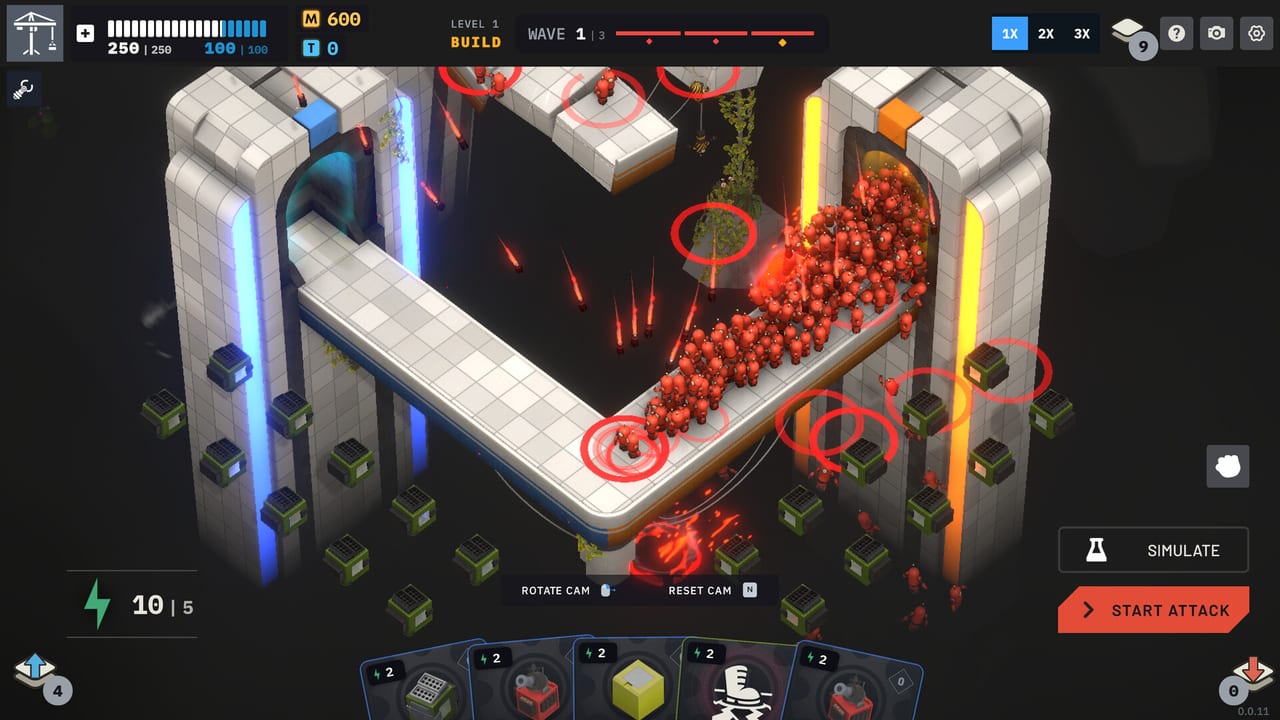
Tower Lab is not a finished 1.0 product yet. Steam Early Access is scheduled for September 7, 2026. Your first-hour job is smaller than a completionist wiki: install or wishlist the Steam build, learn the modes menu, place a few towers in open space, spend energy from your hand, press Start Attack, then survive long enough to understand Matter and the Vend-O-Lab.
This page is that first hour. For the repeating ruleset, jump to the full how-to-play loop. For why robots ignore damage numbers, read the physics basics for knockoff builds. For which playlist to pick after the tutorial, use the campaign and mode comparison.
Install, wishlist, and the modes menu
Wishlist the Steam page now so the launch build is easy to find, then install when Early Access opens. The game ships for Windows and macOS and is marked Steam Deck Playable. It is a single-player title from Devon Powell and Xueer Zhu under Play Tug Studio. It is not a Roblox experience.
On first boot you will see a modes menu, not a single locked campaign button. Campaign is the roguelite deckbuilder most players should start with. Workshop is a sandbox you can share. Standard TD unlocks a campaign toolbox and lets you spend Matter even mid-wave. Endless grows the map procedurally. Puzzle is a simulation and optimization mode. You do not need to understand all five on day one. Pick Campaign, then come back.
If the HUD feels cramped, Steam’s Camera Comfort and Mouse Only Option exist for a reason. Save Anytime is listed too, so you can stop between waves without treating the lab like an arcade credit. The on-screen prompts cover Rotate Cam, Reset Cam (N), Toggle Cooldown (Tab), Move Tower, and Focus Cam (F). Glance at the keyboard and mouse controls list before you fight the camera instead of the robots.
Place towers in open space
Tower Lab does not force a grid of path tiles the way a classic lane defender does. You place towers in open space on a floating lab. Leave room for knockback. A Tesla shoved against a wall cannot fling anything off the map. A Fan needs a corridor of air. A Grinder wants output space for a Conveyor Line.
Start with a small deck. Each wave you draw a hand. Play a card only if you can pay its energy cost (the lightning icon). Placement is mouse-driven: pick the card, click a legal spot, then decide whether the next card is worth the remaining energy. Unused cards stay unplayed. Hand and energy refresh on the next wave, so dumping the whole hand is optional, not required.
Right-click a placed tower to open its menu. From there you can sell or inspect the tech tree. Do not sell your only control piece because an offense tower looks more like a turret from another game. The collection screen lists 20 towers for launch; you will not own the full set in hour one, and you should not try to.
Start Attack, then watch Matter
When the lab looks ready, press Start Attack. That is the commit. Robots path across the platform. Your job is to knock them off before they leak to the exit. There is no health bar to stall. If a robot still has a walkable path, you have a physics problem.
After the wave, count Matter (M). Matter is shop currency. Bigger and grown robots pay more, which is why Grow is an economy tool and not just a joke button. If everything you hit is tiny Plastic, the Vend-O-Lab will feel expensive. If you fatten Iron or Copper bodies and then grind or knock them, the shop opens up.
Simulate exists on the HUD if you want a preview without treating every click as a scored wave. Speed controls run 1X, 2X, and 3X. Photo mode is there for screenshots, not for rewriting a losing line. Use 1X while you are still learning what mass looks like in motion.
The Vend-O-Lab between stages
Clear a stage and the Vend-O-Lab appears. This is the roguelite beat: buy cards into the deck, reroll the offer, remove a card you no longer want, spend tech points (T) on the tech tree, then take the next level.
Region 1 does not start with every toy. A patch pulled Tesla, Salvage, and Hot Swap out of the Region 1 starting deck, so do not assume a demo opener is the launch opener. For a safer first deck, steal ideas from the starter deck examples instead of forcing a Tesla line on wave one.
Buy only what changes mass, direction, or economy. A third offense card that does not work with Fan, Gravity, or a production building is how first-hour decks clog. If the shop is noise, reroll. If the deck is thick, remove. Tech points are not Matter; do not ignore a cheap rank that would make the piece you already placed actually throw bodies.
Your first failed wave is not a DPS problem. Watch which robots leaked to the exit, then spend the next shop on one extra control piece or a card removal rather than another unfocused offense tower.
Frequently Asked Questions
Quick answers for new Tower Lab players.
Do I need to wait for 1.0 before learning the game?
No. Early Access is the planned teaching window, about six to twelve months, with a price rise of about 25% after 1.0. Learn the loop on September 7, 2026; do not wait for a finished campaign to understand knockoff physics.
Where should I place the first towers?
In open space with a cliff, air lane, or conveyor output in mind. Do not hug walls. The physics basics for knockoff builds explains why knockback room matters more than a pretty turret ring.
What is the difference between Matter, energy, and tech points?
Matter (M) is shop currency. Energy (lightning) is the cost to play cards from the current hand. Tech points (T) buy tech-tree ranks. They are three different piles.
Should I start in Campaign or another mode?
Start in Campaign. The campaign and mode comparison covers Standard TD, Endless, Puzzle, and Workshop once you can finish a Vend-O-Lab visit without panicking.
Why is Tesla missing from my Region 1 starter deck?
A patch removed Tesla, Salvage, and Hot Swap from the Region 1 starting deck. That is intentional. Open with control and economy, then buy Tesla later if the materials support it.
Does this wiki list a current dollar price?
No. Check Steam on launch day. The only price fact this site repeats is the planned rise of about 25% after 1.0.